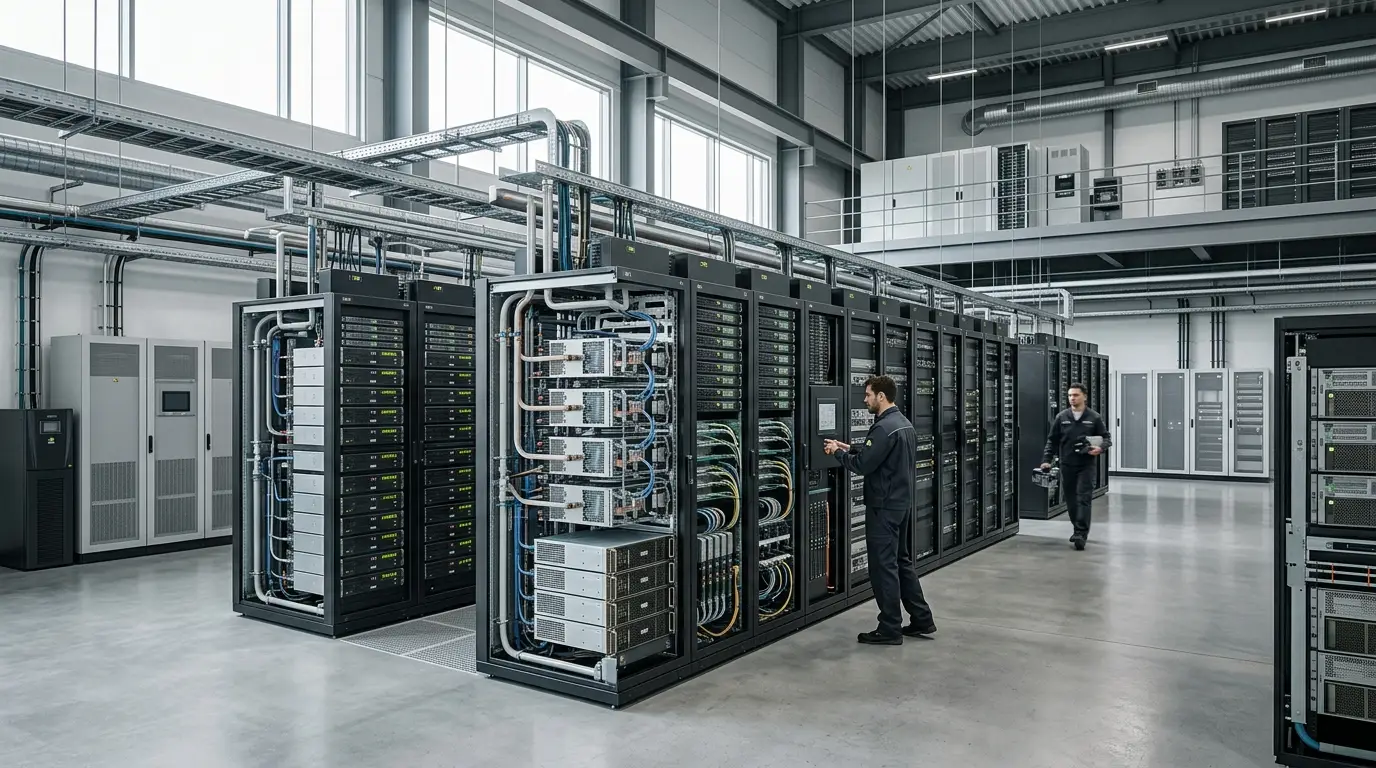
Nvidia DGX is a family of integrated artificial-intelligence systems that combines multiple accelerators with CPUs, high-speed interconnects, networking and supported software. Nvidia uses the wider term AI factory for the data-centre infrastructure that turns data and electricity into model training, inference, simulation and AI services.
A functioning AI factory is not created by ordering GPUs. It needs storage fast enough to feed them, networks capable of synchronizing distributed jobs, power and cooling for unusually dense racks, orchestration that keeps capacity occupied, and operations that can recover from hardware and software failures.
This guide explains those system layers. For the category-level foundation before the Nvidia product map, read how AI infrastructure combines hardware, networks and systems. For the processors themselves, use our Nvidia AI GPU guide. For the full platform including CUDA and enterprise software, start with our complete Nvidia AI guide.
Nvidia infrastructure at a glance
| Term | What it means | Typical buyer or use |
| Nvidia GPU | An accelerator processor or product such as H100, H200, B200 or B300 | Installed in compatible servers and systems |
| SXM or accelerator module | A high-power integrated accelerator form factor used in purpose-built systems | Dense multi-GPU servers |
| HGX | Nvidia's multi-GPU baseboard and reference platform for server manufacturers and clouds | OEM, ODM and hyperscale systems |
| MGX | A modular server reference architecture spanning different CPUs, GPUs and networking | Flexible OEM platforms and enterprise deployment |
| DGX | Nvidia-branded integrated AI server or system | Organizations wanting a validated Nvidia configuration and support path |
| NVL rack | A rack-scale Grace plus GPU platform connected through NVLink | Large training and inference environments |
| DGX SuperPOD | A validated cluster architecture combining many DGX or rack-scale systems with networking, storage and management | Large research, enterprise, cloud and sovereign-AI clusters |
| DGX Cloud | Managed access to Nvidia AI capacity and software through supported cloud infrastructure | Teams avoiding owned infrastructure or needing rapid access |
| AI factory | The complete facility and operational environment for producing AI output | Any serious production deployment, whether owned, hosted or cloud-based |
What is Nvidia DGX?
DGX is Nvidia's own integrated system family for accelerated computing and artificial intelligence. Nvidia chooses and validates the processors, interconnects, networking interfaces, system software and management environment as a complete configuration.
DGX is valuable when a buyer wants:
- a known multi-GPU topology;
- Nvidia-validated drivers and system software;
- a support relationship covering the integrated platform;
- reference performance and deployment patterns;
- and a route to scaling into a larger cluster.
It is not the only way to use Nvidia GPUs. Cloud providers, OEMs and specialist system builders sell many compatible configurations. A partner system can offer better price, local support, storage integration or form factor. DGX's value is integration and validation, not the claim that every other server is unsuitable.
DGX server generations
DGX product names change with Nvidia's accelerator roadmap. Examples include DGX A100, DGX H100, DGX H200, DGX B200 and DGX B300.
A DGX model commonly contains eight data-centre GPUs, but exact CPU, memory, storage, network, size, power and cooling specifications differ.
Nvidia's current DGX B300 specification describes:
- eight Blackwell Ultra GPUs;
- approximately 2.1 TB of total GPU memory;
- a 10U chassis;
- power consumption around 14 kW;
- integrated high-speed networking;
- and Nvidia software including DGX OS and management components.
A 14 kW server cannot be treated like an ordinary enterprise server. Eight units would fill much of a rack's physical space while drawing more than 100 kW before network switches, storage or cooling overhead. Facility design becomes part of the purchase.
What is Nvidia HGX?
HGX is a multi-GPU platform supplied to server manufacturers and cloud providers. It combines Nvidia accelerator modules, NVLink or NVSwitch connectivity and a baseboard architecture that partners integrate into complete servers.
The distinction is practical:
- HGX is a platform used to build systems;
- DGX is Nvidia's own finished and supported system;
- an OEM server can use HGX while adding its own CPUs, chassis, firmware, storage and support.
For buyers, the comparison should include:
- exact GPU and interconnect topology;
- CPU and host-memory capacity;
- network adapters;
- storage options;
- firmware and driver support;
- liquid- or air-cooling requirements;
- service response and spare parts;
- and whether the configuration is validated for the intended software.
What is Nvidia MGX?
MGX is a modular reference architecture intended to help system manufacturers build different accelerated systems from common building blocks. It can support different CPU architectures, GPUs, DPUs and network configurations.
MGX is useful where a buyer needs more flexibility than one fixed DGX design. It can appear in enterprise servers, edge systems and specialized platforms.
The modularity does not remove qualification work. The exact server—not the MGX label alone—determines memory, bandwidth, thermals, firmware, support and application compatibility.
What are GB200 and GB300 NVL72?
GB200 NVL72 and GB300 NVL72 are rack-scale systems that combine 72 GPUs with 36 Grace CPUs and NVLink switching in a liquid-cooled design.
The architecture creates a large scale-up domain: many accelerators communicate through high-bandwidth NVLink as a tightly coupled system. Larger deployments then connect multiple racks through scale-out networking.
Nvidia lists the following for the current GB300 NVL72:
- 72 Blackwell Ultra GPUs;
- 36 Grace CPUs;
- 130 TB/s of aggregate NVLink bandwidth;
- approximately 20 TB of GPU memory;
- and 37 TB of fast memory across the rack.
Those numbers describe a complete Nvidia rack specification. Real application performance depends on model architecture, software, precision, batching, network, storage and quality requirements. Nvidia's comparative performance charts are vendor claims and should be evaluated against independent or buyer-run tests.
What is DGX SuperPOD?
DGX SuperPOD is Nvidia's validated architecture for building larger AI clusters. It combines compute systems with high-performance networking, storage, management software and operational reference designs.
A SuperPOD can scale from a relatively small cluster to thousands or tens of thousands of GPUs. The term does not identify one universal configuration or price.
The value of a validated architecture is repeatability. Large clusters fail in many ways that are invisible in a single-server benchmark:
- network congestion;
- unstable links;
- storage stalls;
- failed accelerators;
- job-scheduler fragmentation;
- thermal throttling;
- firmware inconsistency;
- and long recovery times after a node failure.
Nvidia's DGX SuperPOD documentation and partner designs try to standardize those layers. A buyer still needs workload validation and site-specific engineering.
The main layers of an AI factory
Compute
Compute includes GPUs, CPUs, DPUs and the local interconnect. Capacity planning should separate:
- training;
- fine-tuning;
- batch inference;
- interactive inference;
- data processing;
- simulation;
- and development or testing.
A single shared pool can improve utilization, but high-priority online inference and long training jobs may need different scheduling and failure policies.
Scale-up interconnect
Scale-up connects accelerators within a server or rack. NVLink and NVSwitch let devices exchange data at much higher bandwidth than ordinary host connections.
This layer is especially important when a model is partitioned across GPUs. The slowest communication path can determine the useful speed of the entire system.
Scale-out networking
Scale-out connects servers and racks. Nvidia offers InfiniBand and Spectrum-X Ethernet routes, along with ConnectX adapters and BlueField DPUs.
The design must account for:
- bandwidth per node;
- oversubscription;
- topology;
- congestion control;
- collective communication patterns;
- cable and optical-module reliability;
- network isolation;
- and observability.
Ethernet can be familiar and broadly interoperable. InfiniBand has a long history in high-performance computing and tightly coupled training. The best choice depends on scale, skills, existing standards and required performance.
Storage
AI storage has at least three jobs:
- hold source datasets and model artifacts;
- feed data to training and fine-tuning jobs;
- save checkpoints, logs and outputs.
Object storage can provide durable capacity, while high-performance parallel file systems and local NVMe tiers feed active jobs. A slow data pipeline can leave costly GPUs idle.
Storage planning should include:
- read and write throughput;
- metadata performance;
- small-file behavior;
- checkpoint size and frequency;
- data versioning;
- backup and disaster recovery;
- encryption and access control;
- and data-retention requirements.
Orchestration and scheduling
A cluster needs software to allocate accelerators, prioritize jobs and reduce fragmentation. Kubernetes, Slurm and specialized platforms can manage different parts of the environment.
Nvidia provides or supports tools such as Base Command, Mission Control, GPU Operator, Run:ai and enterprise software components. The tool choice should follow the operating model rather than the vendor diagram.
A useful scheduler must understand:
- GPU type and memory;
- multi-GPU topology;
- reservations and quotas;
- preemption;
- fractional or partitioned GPUs;
- maintenance states;
- and workload priority.
Model and inference software
Training frameworks, containers, NIM microservices, TensorRT-LLM, Triton Inference Server and observability determine how effectively hardware becomes a service.
The commercial layer is explained in our Nvidia AI Enterprise guide.
Power
AI racks can draw tens or more than one hundred kilowatts. Power design includes:
- utility capacity;
- transformers and switchgear;
- power distribution units;
- redundant feeds;
- UPS and generator strategy;
- power quality;
- metering;
- and the time required to obtain a grid connection.
A delayed electrical interconnection can make hardware delivery irrelevant. Our explainer on why AI needs so much electricity provides the wider context.
Cooling
Dense Blackwell and later systems increasingly rely on direct liquid cooling. The facility may need:
- coolant distribution units;
- facility water loops;
- leak detection;
- water-treatment policy;
- heat exchangers;
- dry coolers or cooling towers;
- and trained maintenance procedures.
Liquid cooling can handle density more effectively than air. It also creates new operational dependencies. A rack must be evaluated as a thermal system, not only a compute system.
Security and governance
An AI factory processes data, model weights and credentials that can be highly sensitive.
Controls can include:
- network segmentation;
- identity and workload authentication;
- secure boot and firmware management;
- secrets management;
- encrypted storage and transport;
- container signing and scanning;
- administrative separation;
- audit logs;
- model access controls;
- and incident response.
A DPU can offload or isolate infrastructure services, but no component makes the entire environment secure by itself.
What is DGX Cloud?
DGX Cloud is Nvidia's managed route to AI compute and software on supported cloud infrastructure. It is designed to provide an Nvidia-operated or Nvidia-integrated environment without requiring the customer to build the complete physical platform.
Potential advantages include:
- faster access to large clusters;
- a consistent Nvidia software environment;
- less facility and hardware management;
- managed support;
- and easier temporary scaling.
Potential disadvantages include:
- cloud and service cost;
- provider and regional availability;
- data-location constraints;
- network and egress charges;
- less control over physical configuration;
- and another commercial dependency alongside Nvidia.
A managed platform should be compared with public-cloud instances, specialist GPU clouds, hosted dedicated systems and owned infrastructure on the same workload and service level.
Buy, host or rent?
Public cloud
Best for experimentation, variable demand, rapid region access and integration with existing cloud services. Long-running utilization can be expensive.
Specialist GPU cloud
Can offer competitive access to newer accelerators and large clusters. Evaluate financial stability, networking, support, data governance and portability.
Hosted dedicated infrastructure
A provider owns or operates dedicated systems in a colocation environment. This can provide predictable capacity without the buyer running a facility.
Colocation
The organization owns systems but places them in a data centre with power, cooling and network services. Contracted density and liquid-cooling support are critical.
On-premises
Provides maximum physical control and can support data sovereignty or low-latency requirements. It requires facility readiness, operations and capital.
Hybrid
Many organizations use owned capacity for predictable base demand and cloud for bursts, experiments or rare large jobs. Hybrid portability must be designed in software and data flows.
Total cost of an Nvidia AI factory
The GPU or DGX invoice is only one line.
A complete model includes:
- accelerators and servers;
- network adapters, switches, cables and optics;
- storage and backup;
- racks and coolant distribution;
- electrical and mechanical construction;
- cloud or colocation charges;
- software licenses;
- support and replacement parts;
- staff and on-call operations;
- security and compliance;
- electricity and water;
- financing and depreciation;
- idle capacity;
- and migration or decommissioning.
The correct unit is usually cost per accepted training run, model update, token, request or business outcome. Low purchase cost does not help when utilization is poor or failures keep jobs from completing.
Utilization: the hidden economics
AI accelerators are often treated as scarce capacity, but scarcity does not guarantee productive use.
Utilization falls when:
- data preprocessing is slow;
- jobs request more GPUs than they need;
- small jobs fragment large pools;
- framework and kernel versions are inefficient;
- users reserve systems without running work;
- failures restart long jobs;
- inference traffic is too low for the batch configuration;
- or networking and storage become bottlenecks.
Measure several dimensions:
- accelerator utilization;
- memory use;
- tensor-core activity;
- communication time;
- power draw;
- queue time;
- completed jobs;
- accepted output;
- and cost per result.
A 95% utilization chart can still represent wasted work if the model is repeatedly recomputing, generating rejected output or running on an unnecessarily large system.
Reliability and failure domains
At scale, component failure is normal. An AI factory should assume that GPUs, NICs, switches, optics, drives, coolant loops and software services will fail.
Design questions include:
- Can a training job checkpoint efficiently?
- How long does a failed node take to detect and drain?
- Is there spare capacity?
- Can an inference service reroute traffic?
- Are firmware versions consistent?
- Can a failed rack be isolated?
- What is the replacement commitment?
- Can the scheduler avoid degraded nodes?
- Are configuration and model artifacts reproducible?
Reliability is not only uptime. It is the ability to finish expensive work without repeated loss.
A practical AI-factory planning sequence
- Define workloads and service targets.
- Measure model memory, communication and storage behavior.
- Decide which jobs need tight scale-up versus ordinary scale-out.
- Benchmark representative systems.
- Model capacity growth and product refresh cycles.
- Confirm utility power and cooling before hardware commitments.
- Select network topology and storage from workload evidence.
- Design scheduling, quotas and ownership.
- Establish software, driver and container baselines.
- Create security and data-governance boundaries.
- Plan failure, spares, support and rollback.
- Measure cost per accepted result after launch.
Common infrastructure mistakes
Ordering hardware before power is secured
Lead times for grid connections, transformers and cooling can exceed server delivery.
Treating a rack specification as application performance
Vendor specifications and benchmarks do not include every model, data pipeline and service target.
Underbuilding the network
Accelerators wait while distributed jobs synchronize, producing poor returns on expensive compute.
Using one storage tier for everything
Durable object storage and active training storage solve different problems.
Ignoring software lifecycle
Drivers, firmware, libraries and containers need coordinated updates and rollback.
Buying for peak demand
An owned cluster sized for rare peaks can remain idle. Hybrid capacity may be cheaper.
Assuming liquid cooling is a plumbing detail
It affects facility design, operations, warranties, maintenance and failure response.
Removing human review from high-impact AI because infrastructure is powerful
Compute scale does not make model output correct or authorized.
Frequently asked questions
What is Nvidia DGX?
DGX is Nvidia's family of integrated AI systems combining multiple GPUs with CPUs, networking and supported system software.
What is the difference between DGX and HGX?
HGX is a multi-GPU platform used by system builders. DGX is Nvidia's own complete system family.
What is a DGX SuperPOD?
It is a validated cluster architecture combining many Nvidia systems with high-performance networking, storage and management.
What is an Nvidia AI factory?
It is the complete infrastructure used to train, customize and run AI repeatedly: compute, networking, storage, software, power, cooling and operations.
Does an AI factory have to use Nvidia?
No. The concept can use AMD, custom cloud chips, CPUs or mixed accelerators. Nvidia uses the term prominently for its own full-stack platform.
How much does a DGX system cost?
Pricing varies by generation, configuration, support, region and seller. Request an exact quote and compare complete deployment cost rather than a headline price.
Can DGX run on-premises?
Yes, when the site can provide compatible power, cooling, networking, rack capacity and operations.
Is DGX Cloud the same as renting a GPU virtual machine?
Not exactly. DGX Cloud is an Nvidia-managed or integrated platform with its own software and service layer. A conventional cloud GPU instance exposes infrastructure under the cloud provider's standard service.
Does DGX include Nvidia AI Enterprise?
Entitlements vary by product and contract. Verify the exact DGX SKU, subscription period and current licensing documentation.
What is the biggest AI-factory bottleneck?
It varies. Power availability, HBM and system supply, network communication, storage, software efficiency and low utilization can each become the limiting factor.
Bottom line
DGX turns Nvidia processors into an integrated system, while an AI factory turns systems into a repeatable production environment. The important engineering work happens between those levels: networking, storage, scheduling, power, cooling, software, security and failure recovery.
A buyer should not begin with the maximum number of GPUs. Begin with the workload, service target and data boundary. Then choose the smallest architecture that can meet them reliably, benchmark the full pipeline and expand only when measured utilization and demand justify the next rack.
For broader physical context, read AI World Today's guide to AI data centres and why they matter.

Popular news

How a Dutch Company Secured 5,000 Supercomputer Hours After Being Turned Down
Kimi K3.1 Pro Is 1.56 TB—What Computer Can Handle It?

Protest at Microsoft Data Center in Amsterdam: Hundreds Arrested

AppLovin Surges 71% as Lumentum Sinks 36% in a Turbulent Week for AI Stocks
Arm Doubles Data Center Royalties. What Role Is Nvidia Playing?