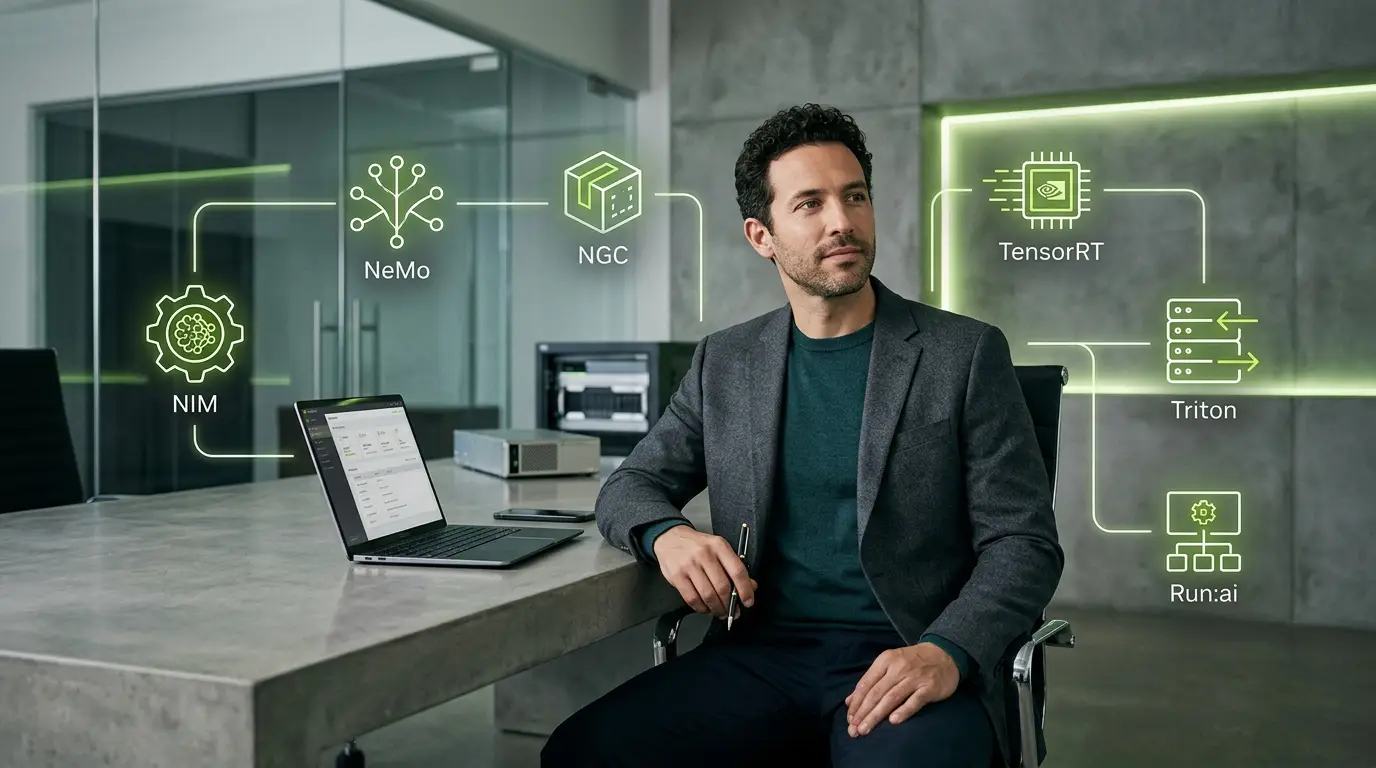
Nvidia AI Enterprise is Nvidia's commercial software suite for developing, deploying and operating artificial-intelligence workloads on supported infrastructure. It combines model and application components with optimized runtimes, orchestration, security maintenance and direct enterprise support.
The suite is not one chatbot, one model or one management console. It is an umbrella covering multiple products and open-source-based components. Some can be downloaded or tested without a production subscription. The commercial license becomes relevant when an organization deploys covered software in production and wants defined maintenance, security updates and support.
For the complete hardware-to-software platform, start with our Nvidia AI guide. For the systems that host this software, use the guide to Nvidia DGX and AI factories. For the developer foundation below many components, read what Nvidia CUDA is. This article owns the enterprise software, entitlement and current pricing questions.
Nvidia AI Enterprise at a glance
| Question | Short answer |
| What is Nvidia AI Enterprise? | A commercial suite of supported AI frameworks, libraries, microservices, orchestration and infrastructure software |
| Is it a model? | No. It can include or support models, but the product is a software and support portfolio |
| Is it required to use Nvidia GPUs? | No. CUDA and many tools can be used without an AI Enterprise license; covered production software and support have separate terms |
| How is it licensed? | Primarily per GPU for self-managed systems, with subscription, perpetual and cloud-consumption routes |
| What is Nvidia NIM? | Containerized microservices and optimized runtimes for deploying supported AI models |
| What is NeMo? | A framework and collection of services for developing, customizing, evaluating and governing generative AI |
| What is NGC? | Nvidia's catalog and registry for containers, models, Helm charts and related software artifacts |
| What is Run:ai? | Nvidia's platform for scheduling, sharing and governing AI compute across clusters |
| Does DGX include the software? | Hopper-based DGX systems include it in the DGX software bundle; current licensing documentation says Blackwell DGX systems require separate AI Enterprise licenses |
| Can it run in public clouds? | Yes, through marketplace consumption or bring-your-own-license routes on supported clouds |
What problem does Nvidia AI Enterprise solve?
A research team can install a framework, download an open model and run an experiment without buying an enterprise software suite. Production changes the requirement.
An organization may need:
- a supported combination of drivers, libraries and containers;
- security fixes and vulnerability guidance;
- long-lived software branches;
- predictable API and version behavior;
- model-serving runtimes;
- cluster scheduling and quotas;
- documented deployment patterns;
- access to Nvidia support engineers;
- and a commercial route for software used across on-premises and cloud environments.
Nvidia AI Enterprise packages those needs around Nvidia's hardware and CUDA ecosystem. It can reduce integration and support burden. It does not remove the customer's responsibility for data governance, application security, model evaluation or correct business use.
The main Nvidia AI Enterprise components
The portfolio changes over time. The components below represent the main functional layers rather than a promise that every item is included in every cloud offer or license.
Nvidia NIM microservices
Nvidia NIM packages supported models and optimized inference runtimes as containerized microservices with standardized APIs. A NIM can be deployed on compatible infrastructure rather than requiring a team to build the complete serving stack from source.
A NIM typically brings together:
- a model or supported model family;
- an optimized runtime;
- a container image;
- an API interface;
- deployment and configuration guidance;
- observability hooks;
- and production updates for eligible enterprise releases.
The value is operational consistency. A developer can call an API while the infrastructure team controls where the model runs.
NIM does not guarantee that every model is available, that every accelerator is supported or that a container is optimal for every latency target. Check the model's support matrix, license, hardware requirement and release tier.
Nvidia NeMo
NeMo covers generative-AI development and customization. Its ecosystem includes tools and microservices for:
- model training and fine-tuning;
- data preparation and curation;
- evaluation;
- retrieval-augmented generation;
- guardrails;
- model optimization;
- and agent-oriented workflows.
“NeMo” can refer to several frameworks and services rather than one application. A buyer should identify the exact component and deployment model.
Nvidia NGC
The NGC catalog distributes containers, models, Helm charts, SDKs and other Nvidia and partner artifacts.
NGC helps teams start from a tested image instead of assembling every dependency manually. It should still be treated as a software supply chain:
- pin image digests and versions;
- scan and approve artifacts;
- mirror critical images where required;
- document licenses;
- and test updates before production.
A container from a trusted registry is not automatically safe for every environment or data type.
TensorRT and TensorRT-LLM
TensorRT optimizes inference graphs for Nvidia hardware. TensorRT-LLM applies optimized kernels, quantization, parallelism, batching and serving techniques to large language models.
The objective is lower latency, greater throughput and better accelerator utilization. Results depend on model architecture, precision, context, batch size and the quality target. Optimization can add build time, engine compatibility requirements and another lifecycle to manage.
Triton Inference Server
Triton Inference Server serves models through standardized endpoints and can support several frameworks and model formats. It provides features such as dynamic batching, model ensembles, concurrent execution and metrics.
Triton is not the same as OpenAI's Triton programming language. They share a name but solve different problems.
Run:ai
Run:ai, acquired by Nvidia, schedules and governs AI workloads across shared accelerator clusters. It can help organizations allocate resources, enforce quotas, prioritize jobs and improve utilization.
A scheduler does not create demand or fix an inefficient model. Its value comes from reducing idle capacity and contention across real workloads.
Nvidia Blueprints
Blueprints are reference workflows containing example code, models, NIM or NeMo components, sample data, deployment material and Helm charts for use cases such as enterprise RAG, research agents, video analytics and robotics simulation.
A blueprint is a starting architecture, not a certified finished business application. The customer must replace sample assumptions, validate data flows, test output and implement authorization.
Omniverse
Omniverse provides libraries and services for simulation, digital twins, industrial workflows and physical AI. It can support synthetic data, robot simulation and collaborative 3D environments.
Its role differs from generative-text deployment. Organizations should not buy the umbrella suite without identifying which components they will actually operate.
GPU infrastructure software
Nvidia's enterprise environment can also include or integrate with:
- GPU Operator for Kubernetes;
- network and device operators;
- drivers and container tooling;
- virtual GPU products;
- Mission Control and Base Command in relevant environments;
- monitoring and telemetry;
- and validated reference architectures.
The exact bundle varies by system, product and contract.
Nvidia AI Enterprise pricing
The figures below are Nvidia's published US list prices in documentation last updated June 8, 2026. They are current to August 7, 2026, before tax, partner discount, regional pricing, support upgrades and infrastructure cost.
Self-managed systems
| License | Term | Published list price | Qualified education, Inception or Connect price |
| Subscription with Business Standard support | 1 year | $4,500 per GPU | $1,125 per GPU |
| Subscription with Business Standard support | 2 years | $9,000 per GPU | $2,250 per GPU |
| Subscription with Business Standard support | 3 years | $13,500 per GPU | $3,375 per GPU |
| Subscription with Business Standard support | 4 years | $18,000 per GPU | $4,500 per GPU |
| Subscription with Business Standard support | 5 years | $18,000 per GPU | $4,500 per GPU |
| Perpetual license plus five years of support | Perpetual use | $22,500 per GPU | $5,625 per GPU |
The five-year subscription uses a published discount equivalent to five years for the price of four. Qualification and volume limits apply to education, Inception and Connect pricing.
Cloud-hosted systems
| Route | Published software price | Infrastructure cost | Support |
| Production marketplace consumption | $1 per GPU hour | Cloud instance and related service charges are additional | Nvidia documents limited support calls for the public offer |
| Development | Free to use or bring your own license | Cloud instance and related service charges are additional | Community channels rather than full production support |
| Private cloud offer | Custom quote for a committed term | Cloud infrastructure charges as contracted | Nvidia AI Enterprise support |
The cloud table can be misleading without the instance price. The $1 per GPU hour is a software charge on top of the accelerator, CPU, network, storage and cloud services.
Use Nvidia's current AI Enterprise pricing documentation for a purchase decision.
How per-GPU licensing works
Nvidia's licensing guide states that a license is required for every GPU installed in a server or workstation that hosts covered AI Enterprise software. A board containing multiple GPUs requires a license for each GPU.
This means a server with eight GPUs can require eight licenses, even if only one team uses the system. Capacity and scheduling decisions therefore affect software cost.
For a compute environment without Nvidia GPUs, the documentation specifies one license per server or instance for covered software.
Example: an eight-GPU self-managed server
At the one-year published list price:
8 GPUs × $4,500 = $36,000 per year
That is the software subscription before hardware, support upgrades, infrastructure, implementation and staff. It is an illustration, not a quote.
Example: cloud production use
A four-GPU instance operating continuously for 30 days would generate the following AI Enterprise software charge:
4 GPUs × 24 hours × 30 days × $1 = $2,880
The underlying cloud instance and all related charges are additional. Stopping unused instances matters.
Which Nvidia products include an entitlement?
Current Nvidia documentation identifies selected entitlements:
- each H100 PCIe or H100 NVL GPU includes a five-year subscription;
- each H200 NVL GPU includes a five-year subscription;
- each A800 40 GB Active GPU includes a three-year subscription;
- Hopper-based DGX systems include AI Enterprise in the DGX software bundle;
- Blackwell-based DGX systems currently require separate licenses.
Activation, start dates and system restrictions apply. Nvidia says included subscriptions are tied to the specific card and begin based on the board's ship date to the OEM plus a defined integration allowance. A buyer should verify how much entitlement time remains at delivery.
Do not assume every H100 or H200 form factor includes the same entitlement. Use the exact product serial number and current licensing guide.
What support is included?
Nvidia's standard subscription includes Business Standard support. The published description includes:
- 24/7 availability for filing a case;
- local business-hours coverage excluding holidays;
- a four-hour initial response target;
- maintenance releases, defect fixes and security patches for selected components;
- access to major upgrades;
- long-term branches for selected software;
- direct support engineering;
- and knowledgebase, web, email and phone channels.
A four-hour initial response is not a four-hour resolution guarantee. Business Critical support and a technical account manager are available as paid upgrades.
Match support to service consequences. A non-critical research environment and a customer-facing inference platform need different response and availability commitments.
Free development versus paid production
Nvidia lets developers test hosted APIs, download components from NGC and prototype on their own infrastructure. A 90-day AI Enterprise production trial is also offered for compatible systems; Nvidia notes that the standard trial includes Omniverse but not Run:ai.
This creates a sensible progression:
- try a hosted API or example;
- prototype with downloadable software;
- benchmark on the intended infrastructure;
- use a time-bounded trial for production-like evaluation;
- buy only after measuring operational value.
“Free to develop” does not mean “free to run indefinitely in production.” Review each component's license and the commercial terms for the deployment.
NIM release tiers and support
NIM offerings can have different maturity and support levels. Nvidia documentation has distinguished early or rapidly available releases from certified enterprise releases.
Before deploying a NIM, check:
- release tier;
- supported GPUs and drivers;
- model license;
- container version;
- API compatibility;
- vulnerability and patch policy;
- context and precision support;
- and whether enterprise support applies.
A Day 0 or preview release can be useful for testing without being appropriate for a regulated production service.
Nvidia AI Enterprise versus open-source software
The comparison is not “paid software versus free software.” Open-source components have real operating cost.
Open-source-first route
Advantages:
- flexibility;
- transparent code and community development;
- the ability to choose models and tools;
- no per-GPU vendor subscription for many components;
- and easier adaptation outside one vendor stack.
Costs and risks:
- integration and dependency management;
- internal support ownership;
- security patching;
- compatibility testing;
- upgrade work;
- and unclear responsibility across components.
Nvidia AI Enterprise route
Advantages:
- validated combinations;
- optimized Nvidia performance;
- supported containers and runtimes;
- maintenance branches;
- direct vendor support;
- and reference architectures.
Costs and risks:
- per-GPU or consumption fees;
- stronger dependence on Nvidia hardware and software;
- component availability differences across clouds;
- and the possibility of paying for a broad suite while using only a small part.
The correct comparison is total operating cost and risk for a defined service. Our separate analysis of how Nvidia makes money from AI explains where software, support and complete-system sales fit inside the wider business model.
Nvidia AI Enterprise versus a managed model API
A managed API such as a hosted language-model service can be much simpler. The provider operates the model and infrastructure, and the customer pays per token or request.
Nvidia AI Enterprise becomes more relevant when the organization needs:
- control over model placement and data location;
- self-hosted or dedicated inference;
- custom models or optimization;
- integration with owned Nvidia infrastructure;
- predictable capacity;
- or a platform spanning multiple clouds and on-premises systems.
A self-hosted stack creates responsibility for uptime, scaling, security and model quality. “Private” is not automatically cheaper or safer.
Where the suite can add value
Supported inference
NIM, TensorRT-LLM and Triton can shorten the path from model artifact to a monitored endpoint.
Hybrid infrastructure
A consistent Nvidia-oriented software baseline can make it easier to move workloads among certified on-premises systems and supported cloud instances.
Shared clusters
Run:ai and infrastructure software can help allocate expensive capacity across teams and workloads.
Enterprise RAG and agents
Blueprints, NeMo and NIM provide reference components for retrieval, evaluation and agent workflows.
Physical AI
Omniverse and domain frameworks support simulation, synthetic data and robotics.
Long-lived production branches
Organizations that cannot upgrade with every open-source release may value maintenance and support for selected components.
Security and governance considerations
Enterprise software does not make an AI application safe by default.
Container supply chain
Use signed and approved images, pin digests, scan dependencies and establish an update process.
Model provenance
Record the source, license, version, fine-tuning data and evaluation results for each model.
Data access
A NIM endpoint should enforce authentication, authorization, rate limits and data boundaries outside the model.
Prompt injection and tool use
RAG and agents can retrieve malicious instructions or call tools incorrectly. Separate model suggestions from authorization.
Logging and retention
Decide what prompts, outputs, traces and model telemetry are stored, where and for how long. Sensitive content can appear in operational logs.
Multi-tenancy
GPU sharing and cluster scheduling require isolation, quotas and secure workload identities. Do not assume a container boundary alone is sufficient for every threat model.
Patching
Enterprise support helps deliver fixes. The customer still has to test and deploy them.
How to evaluate Nvidia AI Enterprise
- Name the exact production service.
- List the suite components required for that service.
- Identify which components are already available and supported in the current stack.
- Calculate licenses for every relevant GPU and environment.
- Add support upgrades and cloud instance costs.
- Benchmark the supported Nvidia path against the existing open-source or managed-service route.
- Measure engineering time, uptime, latency, throughput and accepted output.
- Test upgrades, rollback, security patching and incident support.
- Review portability and exit cost.
- Buy only the capacity and support justified by the service.
Common mistakes
Buying the umbrella without identifying components
A team says it needs “Nvidia AI Enterprise” but cannot name the runtime, orchestration or support problem being solved.
Forgetting per-GPU multiplication
An attractive single-GPU list price becomes material across eight, 72 or hundreds of accelerators.
Counting only the software marketplace charge
Cloud instance, storage, networking, logs and data transfer remain additional.
Assuming every DGX includes the same license
Current Hopper and Blackwell entitlements differ.
Treating a blueprint as a finished application
Reference code requires authentication, testing, data controls and operational ownership.
Deploying preview software as a regulated service
Release tier and support status matter.
Measuring GPU utilization instead of accepted outcomes
Higher occupancy can still produce poor quality, latency or cost.
Frequently asked questions
What is Nvidia AI Enterprise?
It is a commercial suite of Nvidia-supported AI software, microservices, frameworks, orchestration and infrastructure components for production use.
How much does Nvidia AI Enterprise cost?
Nvidia's June 2026 list price is $4,500 per GPU for a one-year self-managed subscription. Multi-year, perpetual, qualified-program and cloud-consumption options differ.
Is Nvidia AI Enterprise free?
Development and trials can be free under specified terms. Production use of covered commercial software generally requires an entitlement or cloud consumption charge.
What is Nvidia NIM?
NIM packages supported models and optimized runtimes as deployable microservices with standardized APIs.
What is the difference between NIM and NeMo?
NIM focuses on deployable model microservices and runtimes. NeMo covers model development, customization, evaluation, RAG, guardrails and related generative-AI workflows.
What is NGC?
NGC is Nvidia's catalog and registry for containers, models, Helm charts, SDKs and other artifacts.
Is TensorRT included?
TensorRT is part of Nvidia's broader software ecosystem and appears in enterprise production stacks. Exact support and licensing depend on product and use.
Does every H100 include five years of AI Enterprise?
Current documentation specifies H100 PCIe and H100 NVL. Verify the exact SKU, activation status and remaining entitlement period.
Can Nvidia AI Enterprise run on AWS, Azure and Google Cloud?
Yes, through supported marketplace and BYOL routes. Component availability and infrastructure configurations differ by provider.
Does Nvidia AI Enterprise support non-Nvidia hardware?
The suite is primarily optimized and licensed around Nvidia infrastructure. Some components or management services can interact with CPU environments, but it is not a hardware-neutral enterprise AI distribution.
Bottom line
Nvidia AI Enterprise turns parts of Nvidia's vast software ecosystem into a supported commercial production platform. NIM, NeMo, NGC, TensorRT, Triton, Run:ai, Omniverse and Blueprints solve different layers; no organization needs all of them merely because it owns Nvidia GPUs.
The decision should begin with a service and an operational gap. Price the license across every GPU, include infrastructure and support, test the real workload and compare the result with open-source and managed alternatives. The suite is valuable when support, optimization and lifecycle stability reduce more cost and risk than the subscription adds.

Popular news

How a Dutch Company Secured 5,000 Supercomputer Hours After Being Turned Down
Kimi K3.1 Pro Is 1.56 TB—What Computer Can Handle It?

Protest at Microsoft Data Center in Amsterdam: Hundreds Arrested

AppLovin Surges 71% as Lumentum Sinks 36% in a Turbulent Week for AI Stocks
Arm Doubles Data Center Royalties. What Role Is Nvidia Playing?