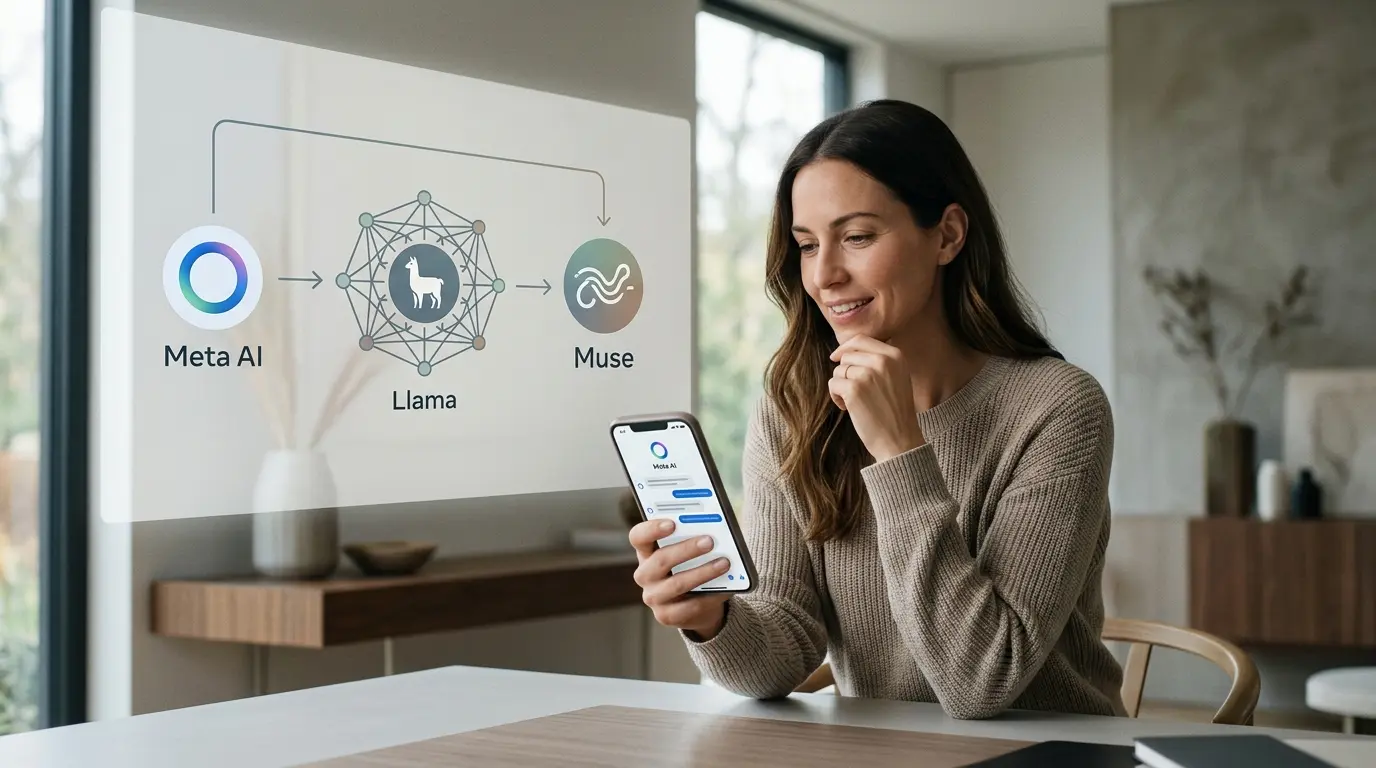
Meta AI is Meta's consumer artificial-intelligence assistant, available through the Meta AI app, the meta.ai website and supported experiences across WhatsApp, Instagram, Facebook, Messenger, Threads and Meta's AI glasses. It can answer questions, search the web, work with images, hold voice conversations, research topics, recommend products and—in supported markets—connect to apps and complete multi-step tasks.
The most important thing to understand in 2026 is that Meta AI is a product, not one model.
Meta originally launched the standalone assistant around Llama 4. Meta has since moved its first-party assistant onto its newer proprietary Muse model family. At the August 7, 2026 cut-off:
- Muse Spark 1.1 powers the action-oriented Meta AI experience in the app and on meta.ai, including planning, research, connected-app work and recurring tasks where those features have rolled out;
- Muse Image powers current image-generation and editing features;
- Muse Spark 1.2 is available through Muse Code and the Meta Model API, but Meta has not said that it universally powers the consumer assistant;
- Llama remains Meta's downloadable, open-weight model family for developers, researchers and self-hosted deployments.
That distinction prevents a common error. Meta AI and Llama belong to the same company and have shared history, but they are not interchangeable names. Read our separate guide to what Llama is for the model family, licenses and deployment options.
Meta AI at a glance
| Question | Short answer |
| What is Meta AI? | Meta's consumer AI assistant across its app, website, social apps and supported devices |
| Who owns it? | Meta Platforms |
| Where can you use it? | The Meta AI app, meta.ai and supported features in WhatsApp, Instagram, Facebook, Messenger, Threads and Meta AI glasses |
| Which model powers it? | Muse Spark currently powers the main assistant; Muse Spark 1.1 powers newer action-oriented capabilities; availability can vary |
| Is Meta AI the same as Llama? | No. Meta AI is a product; Llama is an open-weight model family |
| Is Meta AI free? | A free base experience is available, subject to limits and regional availability |
| Is there a paid plan? | Core assistant access is free; Meta says higher Muse Image usage can be included in paid Meta subscription plans where offered |
| Can it create images? | Yes, through Muse Image in supported surfaces and markets |
| Can it access personal context? | It can personalize responses using information you choose to share and linked Meta accounts, subject to settings and regional availability |
| Does it have a private mode? | Meta AI offers Incognito chats in the standalone app where available; Meta says those chats use Private Processing and are not stored after exit |
| Can businesses build with the same model? | Developers can access Muse models through the Meta Model API and Llama through separate routes; these are not the consumer subscription |
| Can Llama run locally? | Yes, although full Llama 4 models require substantial hardware; smaller Llama models are more practical locally |
What does Meta AI actually include?
Meta AI is better understood as a distributed assistant than as one website.
The Meta AI app and meta.ai
The standalone app and Meta AI website provide the most complete version of the assistant. They support text chat, voice, images, search and—in selected markets—longer-running projects and actions.
Meta launched the app in 2025 as a personal AI experience built around voice, a Discover feed and continuity with Ray-Ban Meta glasses. In April 2026, Meta introduced Muse Spark and said the new model powered the app and website. The upgrade added Instant and Thinking modes, multimodal perception, parallel subagents, stronger visual understanding and richer recommendations drawn from public content and communities across Meta's services.
In July 2026, Meta introduced Muse Spark 1.1 and action-oriented Meta AI. In supported markets, the assistant can:
- create and update plans;
- connect to email and calendar services;
- prepare presentations;
- run recurring tasks and daily briefings;
- conduct multi-step research;
- work with public posts, Reels and Marketplace information;
- and preserve project outputs so the user can revisit them.
These features are rolling out rather than appearing identically for every account. The exact interface depends on country, device, age, account status and current tests.
Meta AI inside WhatsApp and Messenger
Meta AI can appear inside supported messaging apps as a direct chat, a search entry point or an assistant invoked in a conversation. Typical uses include:
- settling a factual question in a group chat;
- drafting a message;
- translating or rephrasing text;
- generating an image;
- finding a restaurant or activity;
- and summarizing information shared in the conversation where the product permits it.
Do not assume the AI can read every private message. The scope depends on how the feature is invoked and which processing method is being used. Meta has also introduced private-processing features for selected AI experiences. The safe rule is to read the current interface notice before sharing sensitive material.
Meta AI inside Instagram, Facebook and Threads
Across Meta's social apps, the assistant can be integrated into search, chat, content discovery and creation. Examples include:
- asking for ideas inspired by public posts or creators;
- exploring trends and locations;
- creating or editing visual content;
- finding Marketplace listings;
- and asking a question without leaving the app.
Meta announced public Instagram mention-based image generation in July 2026 and then removed that feature after feedback. The official Muse Image announcement was updated to reflect the change. This is a useful reminder that a feature announced for one surface can be modified or withdrawn quickly.
Meta AI on AI glasses
Meta AI is a central part of supported Ray-Ban Meta, Oakley Meta and Meta Ray-Ban Display experiences. Voice and camera access create a different kind of assistant: the user can ask about what they are seeing, request directions or context, identify objects and continue an interaction on another device.
That convenience increases the importance of context and bystander privacy. A wearable assistant can capture audio or visual information in public and private spaces, so users should follow local recording laws, visible-device indicators and product guidance.
For practical steps across these surfaces, use our complete guide to how to use Meta AI.
What can Meta AI do?
The exact capabilities vary, but the current product can be grouped into eight categories.
1. Questions, explanations and web search
Meta AI can answer general questions and use web search for current information. It may combine conventional web results with context from public content on Meta's platforms.
Use it for:
- explaining a concept;
- comparing options;
- finding recent information;
- preparing a list of questions;
- or exploring a topic before deeper research.
A fluent answer is not proof that every detail is correct. Check important claims against the original source, especially for health, legal, financial, political or safety-critical decisions.
2. Writing and rewriting
The assistant can draft messages, captions, outlines, invitations, summaries and longer documents. It is particularly convenient when already working inside WhatsApp, Instagram or Facebook.
A useful prompt includes:
- the intended audience;
- the desired outcome;
- the facts that must be preserved;
- the tone;
- and a length or format constraint.
For example:
Rewrite this update for customers. Keep all dates and prices unchanged, use a calm professional tone and limit it to 120 words.
3. Voice and live camera assistance
In supported versions of the Meta AI app and glasses, users can speak naturally, interrupt, switch topics and ask questions about what the camera sees.
This can help with:
- identifying a product or landmark;
- reading and comparing labels;
- troubleshooting something in the home;
- translating visible text;
- or talking through a task hands-free.
The system can still misidentify objects or overlook context. Do not use a camera-based answer as the sole basis for medical diagnosis, electrical work, food-safety decisions or other high-risk action.
4. Image generation and editing
Muse Image allows Meta AI to generate and edit visual content in supported products. Meta says it can handle conversational prompts, image editing, text inside images and practical outputs such as mock-ups or infographics.
Current availability and free allowances vary. Meta describes everyday Muse Image creation as free while offering higher usage through paid Meta subscription plans where available. Read Meta AI pricing before assuming unlimited image generation.
5. Shopping and recommendations
Meta AI can draw on web results, public creator content and Marketplace listings to help users compare products and discover styles or places.
This is one of Meta's clearest differentiators. The company has years of social, commerce and recommendation data. The trade-off is that recommendations may be shaped by availability, personalization, public content and commercial context. Treat them as discovery, not an independent product test.
6. Research and presentations
Newer Meta AI features can gather information, synthesize a report and turn the result into slides. Users can steer the work while it is running and ask the assistant to change emphasis, tone or structure.
For serious research:
- define the question and date range;
- ask for original sources;
- separate facts from interpretation;
- inspect whether citations support each claim;
- verify numbers and quotations manually.
The ability to create a polished deck can make an unsupported conclusion look more authoritative. Presentation quality is not evidence quality.
7. Plans, tasks and briefings
Where action features are available, Meta AI can connect to email or calendar services, produce a plan and deliver recurring updates. Examples from Meta include training schedules, dinner planning, daily briefings and ongoing research alerts.
This moves the product from “answer engine” toward an agent. The security boundary changes when an assistant can read connected data or act on the user's behalf. Start with low-risk permissions, inspect proposed actions and revoke integrations that are no longer needed.
8. Personalization
Meta AI can remember information the user provides and, in supported regions, personalize answers using profile details, engagement or linked accounts in Accounts Center.
Personalization can make an assistant more useful, but it also changes the data relationship. A generic chatbot answer and an answer influenced by social activity are not the same thing. Review the privacy controls and use Incognito chat for conversations that should not become part of the ordinary personalized experience.
Which models power Meta AI?
The model story has changed quickly.
Llama 4 powered the 2025 app launch
Meta's 2025 Meta AI app announcement said the product used Llama 4. That statement is historically accurate for the launch.
Llama remains strategically important to Meta, but the company now positions it primarily as an open-weight model ecosystem for developers. Current public models include Llama 4 Scout and Maverick, while earlier Llama 3.x models remain useful for smaller and local deployments.
Muse Spark powers the current first-party assistant
Meta introduced Muse Spark in April 2026 as the first model from Meta Superintelligence Labs' new Muse series. It said Muse Spark powered the Meta AI app and meta.ai, with rollouts to Meta's other apps and glasses.
Muse Spark 1.1 followed in July. Meta says it is available in Thinking mode in Meta AI and through the public-preview Meta Model API. It is designed for long-running agentic work, tool use, computer use, coding and multimodal understanding.
Muse Spark 1.2 launched on August 5, 2026 for Muse Code and the Meta Model API. That does not automatically mean the consumer assistant switched entirely to 1.2. Model availability should be stated only where Meta has confirmed it.
Muse Image handles current image creation
Muse Image is the separate image model available through Meta AI. This division matters because a single assistant can orchestrate several specialized models rather than route every task to one general-purpose system.
Meta AI, Llama API and Meta Model API are separate
| Layer | What it is | Main audience | Can you download the model? |
| Meta AI | Consumer assistant and app experience | General users | No |
| Muse Spark | Proprietary model family behind current Meta products and Meta Model API | Meta products and developers with API access | No public weights |
| Muse Image | Proprietary image model inside Meta AI | Consumers and Meta product users | No public weights |
| Llama | Open-weight model family | Developers, researchers and organizations | Yes, under Meta's license |
| Llama API | Meta's 2025 limited preview plus third-party hosted routes for Llama | Developers | Do not assume one universal current Meta production endpoint; verify access and terms |
| Meta Model API | Hosted developer access to Muse models | Developers building agentic applications | No public Muse weights |
Our Llama API guide covers the developer routes. For infrastructure under your own control, see how to run Llama locally.
Is Meta AI free?
Meta AI has a free core experience, but “free” should not be read as unlimited, identical worldwide or permanently fixed.
Meta says everyday creation with Muse Image is free and that people who want to create more can receive higher allowances through Meta subscription plans where those plans are offered. Meta does not publish one universal global Meta AI subscription with identical prices, features and limits in every market. The app, website, image tools, video features and connected-device benefits may therefore have different limits.
Four separate cost categories should not be confused:
- Meta AI consumer access: core chat and assistant use that is currently free in supported markets;
- optional Meta subscriptions: higher media-generation or related allowances where Meta offers them;
- hosted Llama access: third-party API or cloud usage billed under the selected provider's terms, plus any Meta preview access that remains available to an account;
- Meta Model API: developer access to Muse models under its own metered pricing and terms.
A consumer subscription does not automatically include developer API credits. A downloadable Llama model does not create an ordinary per-token fee to Meta under the community license, but self-hosting creates hardware, electricity, engineering, monitoring and security costs.
Read our dedicated Meta AI pricing guide for the current cost structure.
Is Meta AI safe and private?
Meta AI can be used safely for many ordinary tasks, but the answer depends on the surface, settings, data and consequences of an error.
Ordinary chats and personalization
Meta says it uses information from AI interactions in accordance with its privacy policy. From December 16, 2025, interactions with generative AI became an additional signal for personalizing content and advertising in most covered regions. Meta says conversations about certain sensitive topics are not used to target ads.
This does not mean every chat is published. It means ordinary AI interactions can affect the wider personalized Meta experience. Linked accounts in Accounts Center can also influence how signals work across services.
Incognito chats
Meta's Incognito chat help page says:
- only the user can see the chat;
- Meta cannot access it;
- the conversation is not saved after exit;
- it uses Private Processing;
- and it cannot be shared.
Web search may still send a generated query to selected search engines without linking it to the user's account. Incognito is a strong option for private everyday conversations, but it does not turn Meta AI into an approved environment for regulated corporate data.
Accuracy and high-impact decisions
Like other generative AI systems, Meta AI can produce incorrect, incomplete or fabricated material. Do not rely on it alone for:
- diagnosis or treatment;
- legal rights or deadlines;
- investment or tax decisions;
- emergency instructions;
- identity verification;
- hiring, credit or insurance decisions;
- or facts that could harm someone if wrong.
Business use
A company should distinguish casual employee use from an approved AI system. Before entering confidential information, verify:
- the exact Meta product and account type;
- applicable terms;
- retention and training controls;
- connected apps and permissions;
- data location and subprocessors where relevant;
- identity and access controls;
- export and deletion processes;
- and whether the workflow requires human approval.
For a full deployment-specific assessment, read Is Meta AI safe?.
Meta AI versus ChatGPT
Meta AI's strongest advantage is distribution. It sits inside apps billions of people already use and can connect social content, messaging, commerce and wearable hardware.
ChatGPT's strongest advantage is the maturity of its standalone work environment. It offers deeper project, file, coding and business-workspace capabilities, with paid individual and organizational plans.
Choose Meta AI when:
- you want a free assistant inside Meta's apps;
- social discovery, Marketplace or glasses matter;
- natural voice and camera use are central;
- or you prefer an assistant that can use your Meta context.
Choose ChatGPT when:
- complex files and projects are central;
- you need a managed business workspace;
- coding and professional knowledge work dominate;
- or you want a product less tied to a social-network ecosystem.
The full decision matrix is in Meta AI versus ChatGPT.
How Llama compares with other model platforms
Meta AI versus ChatGPT is a product comparison. Technical teams choosing a model or deployment architecture face a different decision. Our Llama versus DeepSeek comparison examines two open-weight ecosystems, while Llama versus Gemini compares downloadable models with Google's managed multimodal platform.
Organizations planning to download, adapt or redistribute Meta's weights should also read what the Llama license actually allows. Llama is broadly usable, but “open-weight” does not remove attribution, acceptable-use, large-platform or model-specific geographic conditions.
What is Meta AI best used for?
Meta AI is particularly well suited to:
- quick questions while already using WhatsApp, Instagram or Facebook;
- voice and camera help on a phone or glasses;
- discovering products, places, posts and trends;
- drafting social or conversational content;
- creating and editing images;
- planning everyday activities;
- and receiving recurring briefings where action features are available.
It is less naturally suited to:
- confidential work without an approved account and policy;
- deterministic calculations that should be handled by software;
- high-impact decisions without expert review;
- tasks requiring guaranteed source accuracy;
- or local/offline inference. For the last category, use Llama rather than the hosted Meta AI product.
How to evaluate Meta AI before relying on it
1. Test the actual account and surface
Features differ across the app, website, messaging services and glasses. Test where the work will occur, not in a different product demo.
2. Use representative prompts
Include ordinary, difficult, ambiguous and adversarial examples. Do not evaluate an assistant on one impressive answer.
3. Check sources
Ask where current claims came from and open the original page. Confirm that the source actually supports the statement.
4. Inspect permissions
List every connected account, app, data source and action the assistant can access. Reduce permissions to the minimum necessary.
5. Measure the complete workflow
Track whether the result is accepted, how much editing it needs, how often it fails, how long it takes and what the free or paid limits mean in practice.
6. Re-test after major updates
Meta's shift from Llama 4 to Muse Spark and then to action-oriented Muse Spark 1.1 happened quickly. Maintain a small regression set rather than assuming the product behaves the same after each rollout.
Frequently asked questions
What is Meta AI in simple terms?
Meta AI is Meta's chatbot and digital assistant. It can answer questions, create content, search, work with images and help with tasks across the Meta AI app, meta.ai and supported Meta apps and devices.
Is Meta AI the same as Facebook AI?
Meta AI is the company-wide assistant used across several Meta products, including Facebook. It is not limited to Facebook and should not be confused with every machine-learning system Meta uses for feeds, ads or moderation.
Is Meta AI the same as Llama?
No. Meta AI is a finished consumer product. Llama is Meta's downloadable model family for developers. Meta AI used Llama 4 at launch, but current first-party Meta AI is powered by Muse models.
Which model does Meta AI use in 2026?
Meta says Muse Spark powers Meta AI, with Muse Spark 1.1 available in Thinking mode and powering newer action-oriented capabilities. Muse Image powers current image generation. Availability can vary by account and region.
Is Meta AI free?
Core Meta AI access is currently free where supported. Usage limits apply, and higher media-generation allowances may be attached to paid Meta subscription plans where offered.
Do I need Facebook to use Meta AI?
Not necessarily. The standalone app and website can be available through a Meta account, while other surfaces use the relevant WhatsApp, Instagram, Facebook or Messenger account. Exact sign-in requirements vary.
Can Meta AI read my WhatsApp messages?
Do not assume it reads every conversation. The data available depends on the feature, how the assistant is invoked and the processing method. Read the notice shown in the specific experience before sharing sensitive material.
Does Meta AI use chats for advertising?
Meta says interactions with its generative AI features can be used to personalize content and ads in most covered regions. Certain sensitive-topic interactions are excluded from ad targeting. Incognito chats use a separate private-processing design.
Can I run Meta AI locally?
No. The consumer Meta AI assistant is hosted by Meta. You can run selected Llama models locally, but that creates a different assistant without Meta AI's proprietary Muse models, social integrations or account context.
Can businesses use Meta AI?
Employees can use it for low-risk tasks under an approved policy, but companies should not assume the consumer product provides enterprise governance. Evaluate terms, retention, permissions, data classification and human review. For controlled deployment, Llama or an approved API may be more appropriate.
The bottom line
Meta AI is no longer best described as “Meta's Llama chatbot.” It is a broad assistant distributed across Meta's apps, website and devices, now powered by the company's proprietary Muse models while Llama continues as a separate open-weight platform.
That gives Meta an unusual position. It controls a consumer assistant with enormous distribution, a social and commerce context layer, wearable hardware, proprietary frontier models and an open-weight ecosystem for outside developers.
For consumers, the decision is whether Meta AI's convenience, personalization and free core access outweigh the need to manage privacy and verify important answers. For developers, the more consequential decision is whether to build with the hosted Muse stack, a third-party Llama provider, any Meta Llama preview access that remains available, or self-hosted weights.

byDavid Porter
Popular news

Latest comments
Loading