Contract, CV, or customer data in ChatGPT? Run this traffic‐light check
GuidesMonday, 17 August 2026 at 08:00
Having a long contract summarized, a résumé polished, or customer feedback sorted—it sounds perfect for ChatGPT. Technically, it’s easy too. ChatGPT supports documents, spreadsheets, and PDFs as sources for summaries or analysis.
But an upload button doesn’t mean every document belongs there.
A résumé contains personal data. A customer file may include names, email addresses, orders, and complaints. Even a business contract can hold signatures, direct phone numbers, confidential rates, or details about individual employees.
So the safest rule of thumb isn’t: “Can ChatGPT open this file?” The real question is:
Does ChatGPT truly need to see the entire file to do this job?
New AP guidance sharpens the question
On July 13, 2026, the Dutch Data Protection Authority (Autoriteit Persoonsgegevens) published new guidance on generative AI and the GDPR, plus a practical decision-support tool. The explanation targets organizations developing or implementing a generative AI system.
There’s no one-size-fits-all answer that says every document always can or never can go into ChatGPT. An organization must consider purpose, the vendor’s role, legal basis, data minimization, security, transparency, human oversight, and whether a Data Protection Impact Assessment (DPIA) is needed.
The traffic-light check below is a practical first filter. It does not replace legal or internal review.
An upload is still data processing
When an organization enters personal data into an AI chatbot, that data is being processed. As a result, the GDPR, internal security rules, customer agreements, and confidentiality obligations may apply.
The Dutch DPA has previously warned about data breaches where employees shared, for example, patient data with an AI chatbot. There’s often no malicious intent—someone just wants a faster summary, advice, or draft.
The GDPR requires, among other things, that personal data be processed for a clear purpose and limited to what’s necessary. That principle is called data minimization.
You usually don’t need to upload a fully signed contract to summarize a termination clause. And to improve the wording of a résumé, a chatbot typically doesn’t need a home address, date of birth, or phone number.
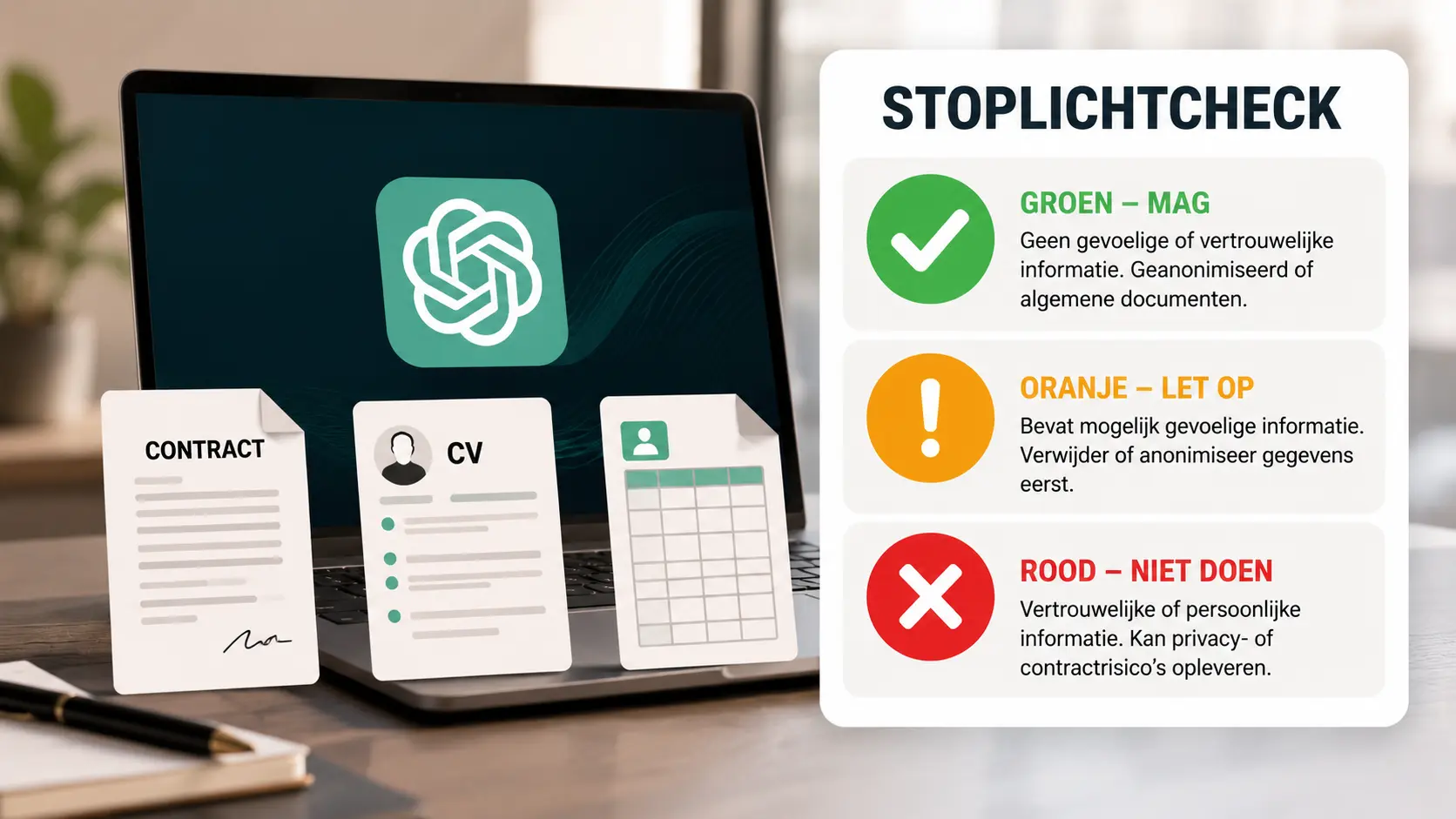
The document traffic-light check
Green: generally fine to use
The green category covers information that is public, fictional, or truly anonymized.
Think of:
- a public job posting;
- an empty, publicly available contract template;
- self-created fictional customer cases;
- a text snippet without names, contact details, or traceable information;
- a product description already on the company website;
- synthetic sample data that does not refer to real people.
Even in green, review still matters. Public information can be copyright-protected, and company documents may have internal restrictions. But the direct privacy risk is usually limited.
Amber: only after trimming and checks
Amber documents can be useful, but must be edited first and used only in an approved work environment.
Examples include:
- your own résumé without address, date of birth, and contact details;
- a contract excerpt with names, signatures, and case details replaced;
- an internal memo without confidential figures;
- a list of customer questions with names and order numbers removed;
- pseudonymized data, such as “Customer A” and “Employee B.”
Pseudonymization is not the same as anonymization. If someone in the organization can still identify “Customer A” using a separate list, it remains personal data.
For amber, check first:
- Has the organization approved this AI tool?
- Am I using the managed work account?
- Is there a clear business purpose?
- Can I remove even more data?
- Is processing this information allowed under contracts and internal policy?
- Who reviews the final output?
Red: don’t enter without a formal, explicit process
For red information, a regular chat isn’t appropriate. Stop and ask your privacy, security, or legal lead for guidance.
Examples include:
- complete customer files with names and contact details;
- national ID numbers, identity documents, and bank details;
- medical information;
- personnel files, performance reviews, and disciplinary records;
- passwords, access codes, and API keys;
- confidential acquisition plans or non-public financial figures;
- legal files and privileged correspondence;
- contracts with signatures and sensitive commercial terms.
Not all trade secrets are personal data. Yet sharing them improperly can still cause major damage. The GDPR isn’t the only control that matters.
How to create a safe working copy
Removing a single name from the first paragraph isn’t enough. Personal data can appear in multiple places across a document.
Always make a separate working copy and check:
- the file name;
- names and initials in the text;
- addresses, email addresses, and phone numbers;
- customer, case, and order numbers;
- signatures;
- comments and tracked changes;
- author and document properties;
- hidden sheets, rows, or columns;
- headers and footers;
- hyperlinks that include names or internal locations.
The Dutch Data Protection Authority warns that documents can hide personal data in metadata, comments, and tracked changes. Simply placing a black shape over text is not reliable redaction: the underlying text may still be present or copyable.
Save the redacted version separately, reopen it, and try to recover the removed information yourself.
Only upload the necessary excerpt
The simplest—and often best—security move: don’t upload the entire document.
Need the notice period? Share only the relevant clauses. Polishing three resume sentences? Paste only those lines. Categorizing customer questions? Strip identifiers and use just the questions.
A strong prompt might be:
Analyze only the anonymized contract excerpt below. Explain the obligations in plain language. Do not invent missing clauses and state explicitly which conclusions you cannot draw without the full contract.
This cuts both privacy risk and the chance ChatGPT pretends to have more context than it actually received.
A work account matters—it's not a free pass
Check not only which email you’re logged in with, but also whether you’re truly operating inside your organization’s managed AI environment.
According to OpenAI’s official documentation, ChatGPT Enterprise offers workspace controls, encryption, and no default training on company data. Retention periods, logging, and available features can still vary by plan, region, and configuration.
“Not used for training” does not mean “not processed or stored.” Even in a business setup, data minimization, access controls, retention limits, and human oversight remain essential.
If your employer lacks an approved environment or clear policy, a personal ChatGPT account is not a safe fallback.
Frequently asked questions
Can I put my own resume in ChatGPT?
Yes—but only if you carefully choose what to share. Preferably remove your address, date of birth, phone number, and any details not needed for the requested edit.
Is a document safe once all names are removed?
Not automatically. Roles, unique events, case numbers, and combinations of details can still identify someone. Check metadata and comments too.
Can I pseudonymize a customer file?
Pseudonymization reduces risk, but data still falls under the GDPR if people can be re-identified. Upload only what’s necessary and allowed by your organization.
Is this article legal advice?
No. It’s a practical first check. For special-category data, large datasets, HR information, or contractual confidentiality, seek review by a privacy or legal expert.

Popular news




Latest comments
Loading